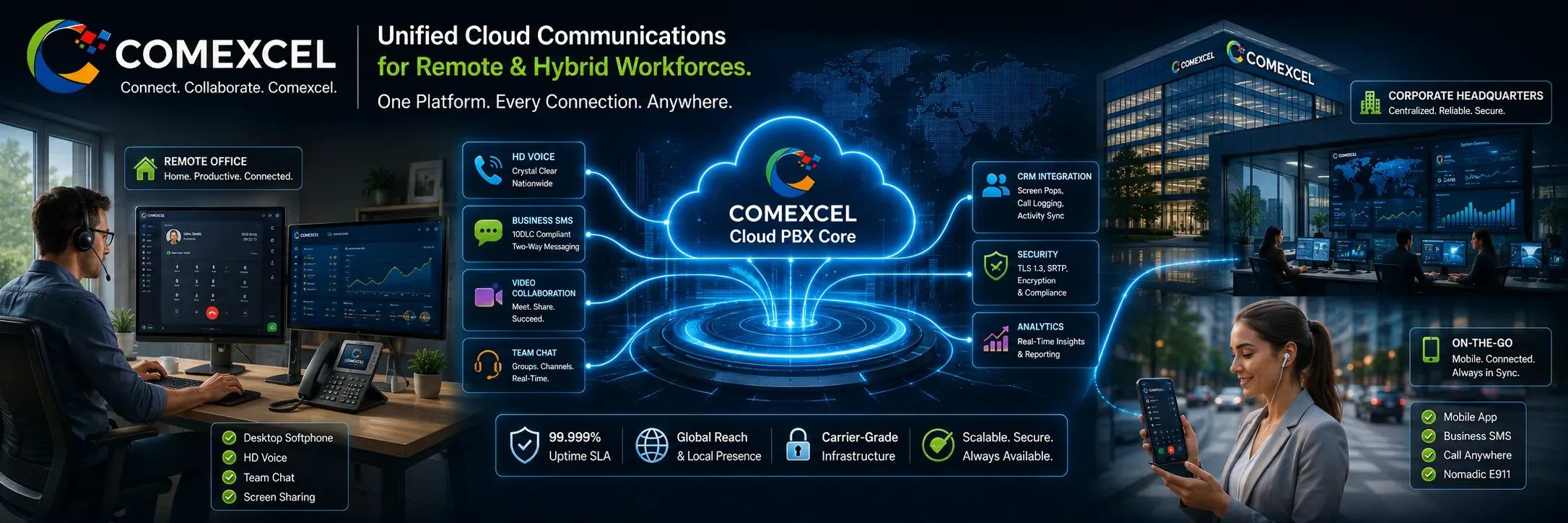
Ultrawide architectural diagram showing home office workers, mobile employees, and corporate headquarters connected through the central COMEXCEL Cloud PBX network.

Business Communications for Remote & Hybrid Work

Connect distributed teams with business voice, SMS, video, messaging, and CRM workflows—from the office, home, or on the go.

A remote work business phone system is a cloud-hosted VoIP solution that allows distributed employees to make and receive company calls across desktop softphones, mobile apps, and IP desk phones while maintaining a single business number and company extension. It eliminates the need for expensive on-premise hardware by unifying voice calling, business SMS/MMS, video collaboration, and CRM integrations into one synchronized cloud platform. Remote and hybrid teams retain full access to multi-level auto-attendants, intelligent queue routing, centralized call recording, and nomadic E911 life-safety protections from any location. Explore how our complete Business VoIP & Cloud PBX Solutions help modern organizations reduce operating costs by up to 70% while supporting flexible work environments.

Cloud-Native Flexibility: Replace Rigid Legacy Hardware

Traditional on-premise PBX hardware traps communications inside physical office buildings, forcing remote workers onto unmonitored personal devices. COMEXCEL migrates voice infrastructure directly to the cloud, giving distributed staff full office functionality without requiring dedicated on-site hardware. By decoupling company phone numbers and extensions from physical desks, organizations eliminate geographic boundaries and maintain seamless business continuity. Upgrading to a virtual infrastructure simplifies multi-site management while delivering immediate operational agility.

Maintain a Unified Corporate Identity

Eliminate the security and privacy risks of employees using personal mobile numbers for business outreach. Outbound calls and text messages display verified corporate caller ID regardless of whether the agent works from home, a client site, or an airport. Maintaining a single corporate voice identity builds customer trust and protects business relationship records.

Simultaneous Ring and Cross-Device Call Flip

Ensure no client opportunity goes unanswered by ringing desktop softphones, mobile apps, and home IP desk phones at the same time. Employees can answer on a laptop softphone and flip the live call to a mobile device with a single click without dropping the line. This flexibility enables smooth transitions between home workstations and on-the-go meetings.

Direct Inward Dialing and Universal Extension Transfers

Provide remote team members with dedicated Direct Inward Dialing (DID) numbers and short extension dialing. Staff can seamlessly transfer live customer calls across home offices, branch locations, and mobile devices using standard 3-digit or 4-digit extensions. Intuitive extension directories ensure remote teams collaborate as effectively as if they shared the same physical office.
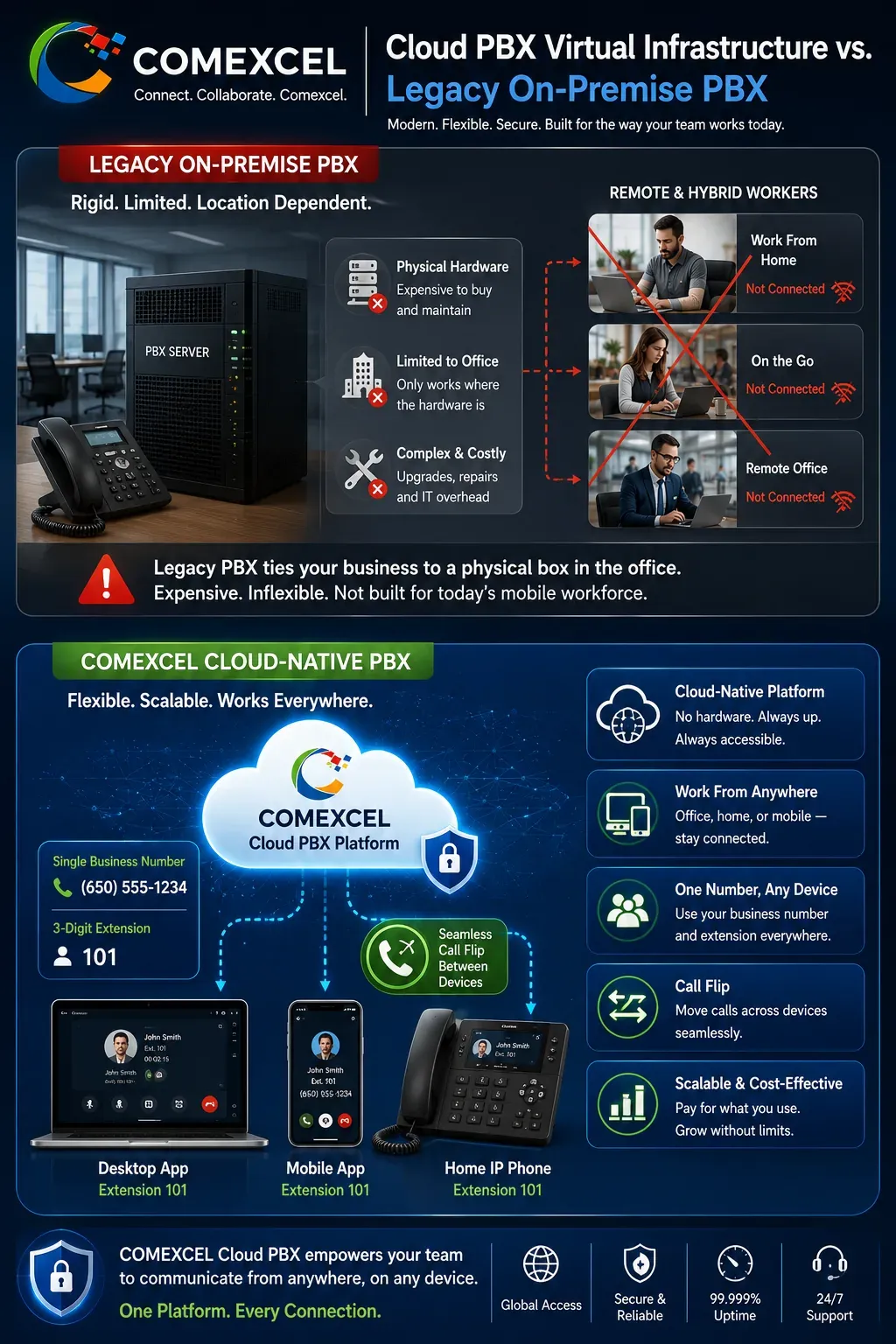
Technical comparison diagram illustrating legacy PBX physical office limitations versus COMEXCEL cloud-hosted multi-device call flip and universal extension dialing.

Distributed Call Management: Route Calls to People, Not Buildings

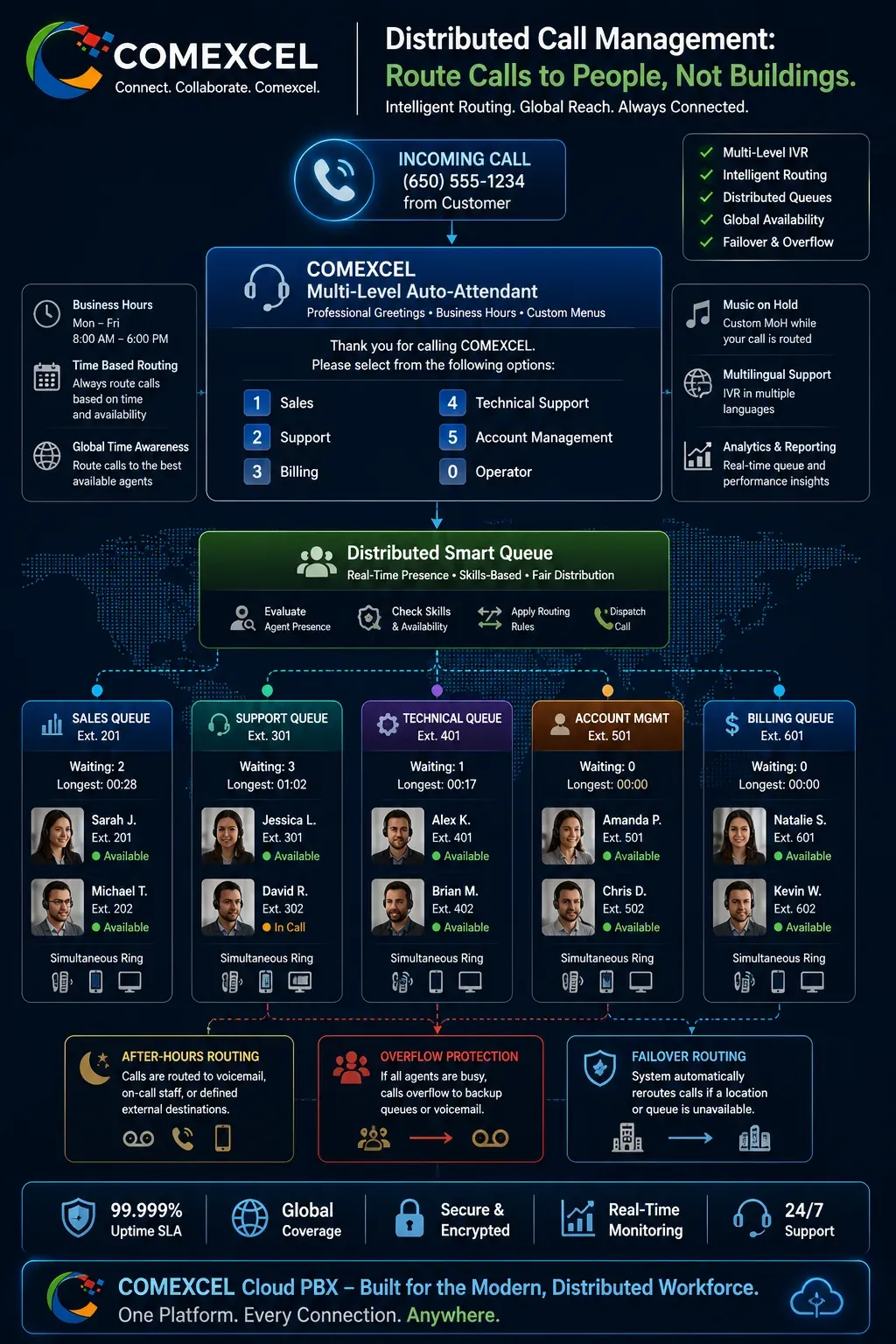
Effective remote organizations depend on intelligent call distribution rather than manual call forwarding. COMEXCEL enables administrators to direct inbound customer traffic based on employee availability, operating schedules, and skill sets. Automated digital receptionists handle initial caller screening, ensuring calls route directly to remote specialists on the first attempt. This automated distribution optimizes team productivity, reduces hold times, and eliminates abandoned inbound calls.

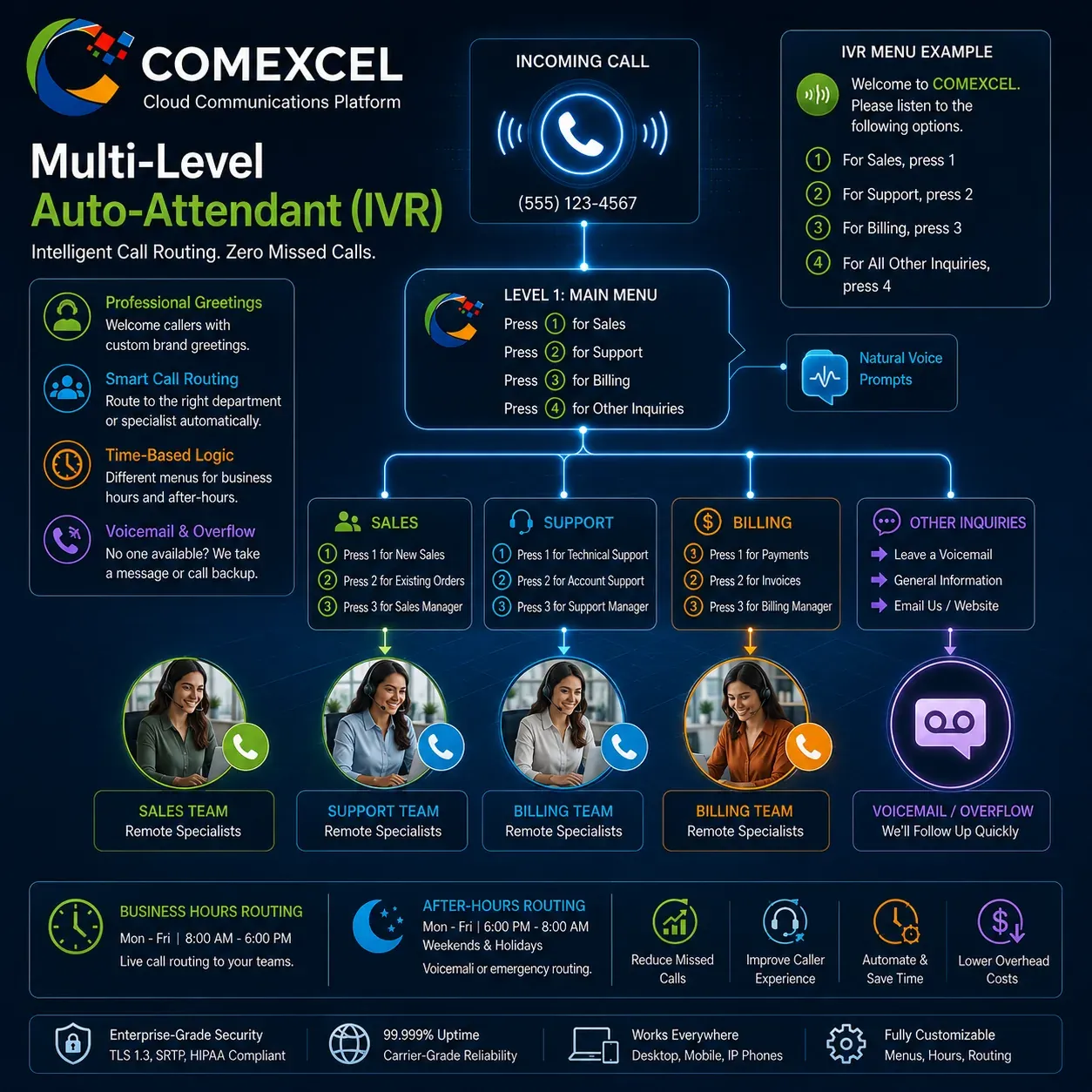
Multi-Level Interactive Voice Response (IVR)

Deploy automated digital receptionists that greet callers professionally and route inquiries dynamically. Custom IVR menus direct callers to specific departments, billing queues, or remote support tiers based on selected keypad inputs. Automated call steering reduces front-desk bottlenecks and maintains 24/7 business accessibility.

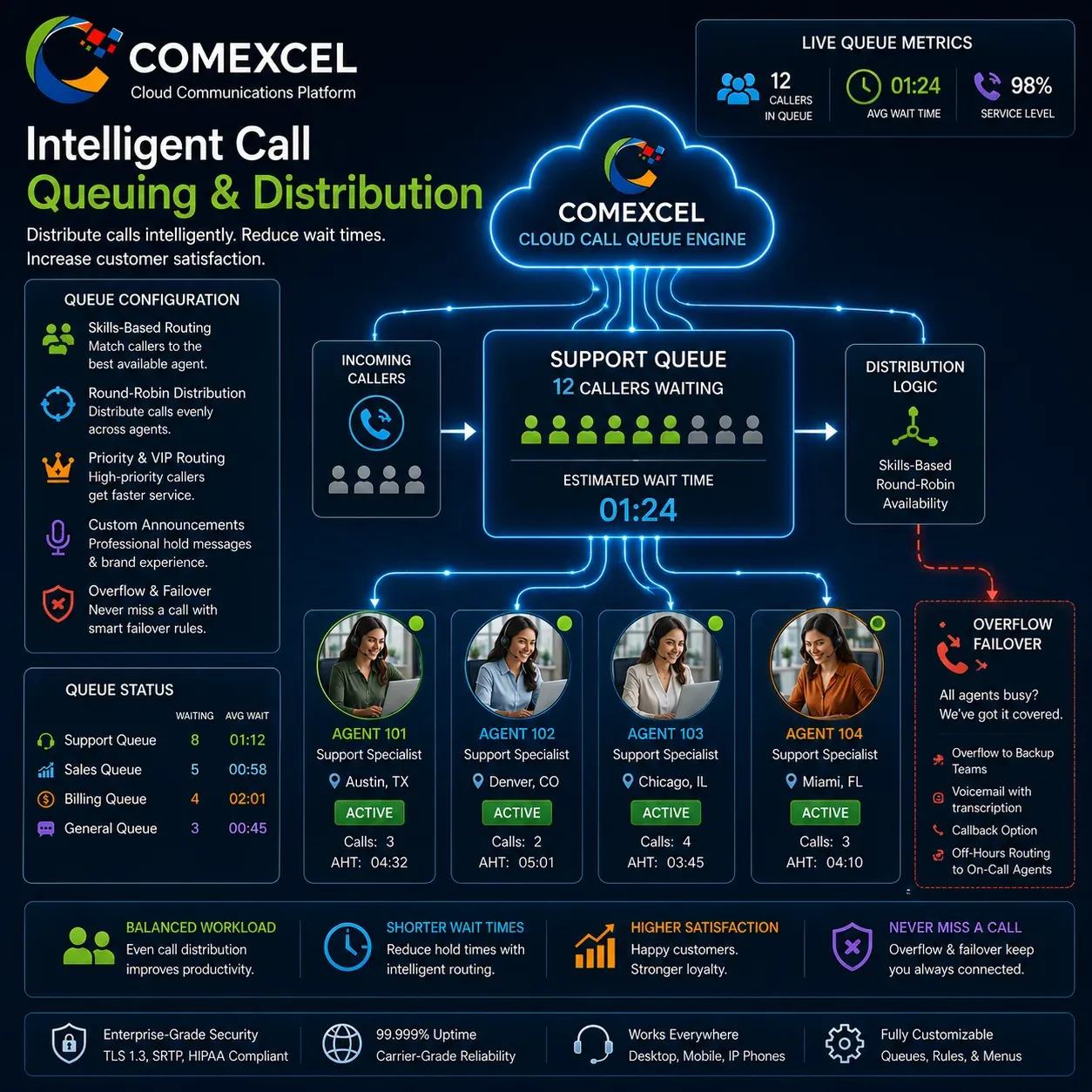
Intelligent Ring Groups and Distributed Queues

Organize remote staff into specialized call queues and department ring groups based on skill, workload, or language. Incoming calls distribute sequentially, simultaneously, or through round-robin logic to ensure balanced team workload and rapid customer resolution. Built-in queue overflow rules automatically route surplus calls to backup queues or voicemail during peak volume.

Business Hours, Time-of-Day, and Holiday Routing

Customize call-routing paths automatically based on organizational work hours, time zones, and holiday calendars. Daytime traffic routes directly to active remote agents, while after-hours calls redirect to designated on-call staff or an emergency voicemail box. Custom rules prevent after-hours disruptions to employee personal lives while keeping the business responsive.

Flowchart showing an incoming customer call routed via auto-attendant IVR menus to distributed remote call queues and dynamic ring groups.

Intelligent Call Management for Distributed Teams

Direct incoming customer traffic seamlessly to remote employees without relying on physical office infrastructure. Our cloud routing tools ensure callers reach the right specialist on the first attempt, whether staff are working from home, a corporate branch, or on the road.

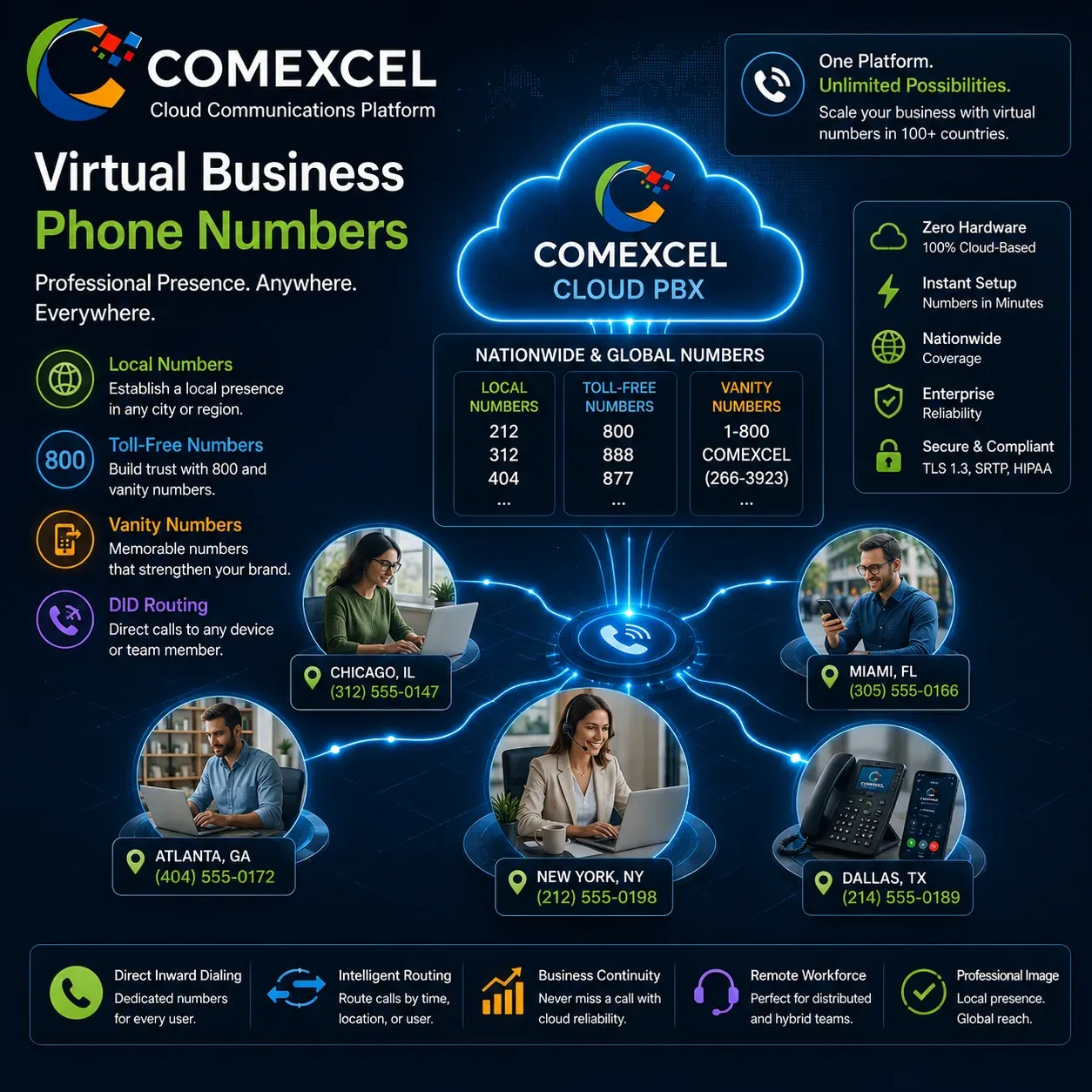
Virtual Business Phone Numbers

Establish a professional local, toll-free, or vanity presence across distributed markets without physical landlines. Assign dedicated direct inward dialing (DID) numbers to remote staff with zero on-site hardware.Explore Virtual Numbers

Multi-Level Auto-Attendant (IVR)

Greet inbound callers professionally and steer traffic automatically to the right department or remote specialist. Eliminate receptionist bottlenecks with customizable digital menus and after-hours call handling.Explore Auto-Attendant

Intelligent Call Queuing & Distribution

Manage high-volume customer inquiries by distributing calls evenly across distributed agents via skills-based or round-robin logic. Prevent call abandonment with automated overflow rules and custom hold-time announcements.Explore Call Queues

Connected Collaboration: Voice, Video, SMS, and CRM Integration

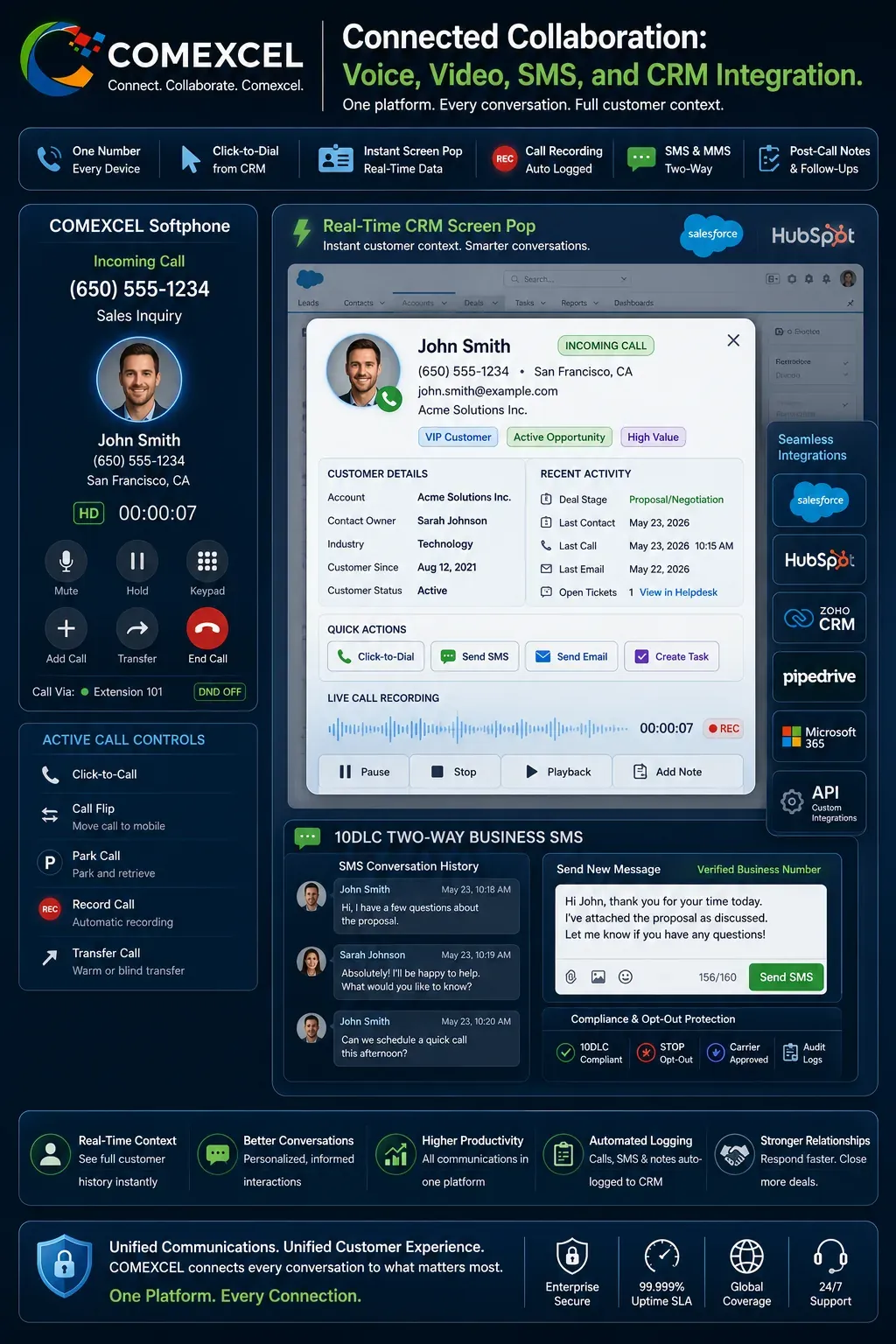
Remote teams succeed when communications channels and customer relationship workflows operate within a single interface. COMEXCEL brings voice calling, A2P 10DLC business SMS, video collaboration, and deep CRM sync into one unified platform. Integrating phone events directly with business software eliminates manual administrative data entry and keeps remote teams aligned. Centralized cross-channel logs give sales and support representatives instant customer context on every interaction.

Two-Way Business SMS and MMS Messaging

Send and receive text messages, multimedia attachments, and appointment reminders using company business numbers. Employees communicate with clients via business texting while protecting their personal mobile phone privacy. All messaging interactions remain fully compliant with 10DLC carrier frameworks and centralized corporate records.

Instant CRM Screen Pops and Click-to-Dial

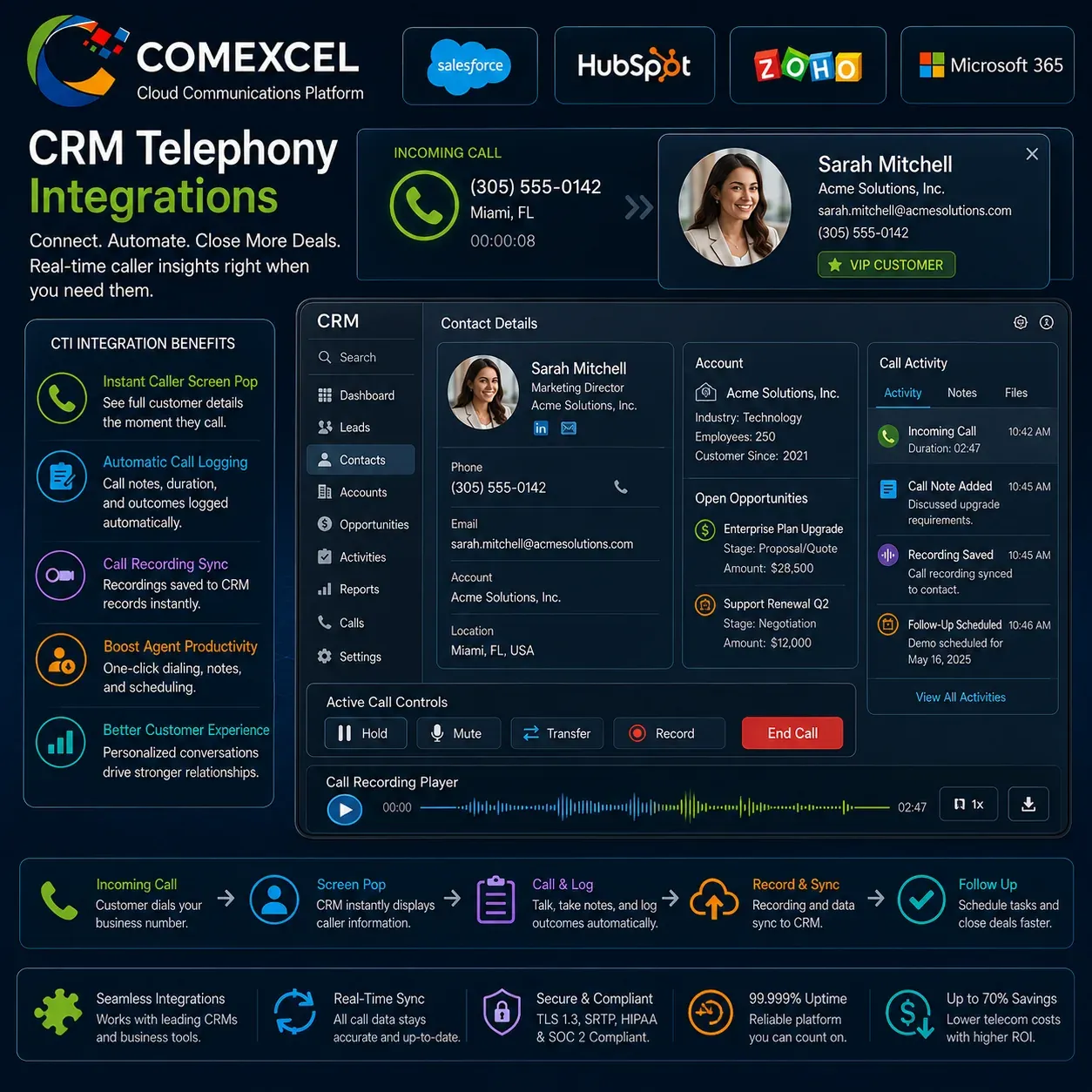
Connect voice communications directly into major CRM platforms including Salesforce, HubSpot, Zoho, and Microsoft 365. Inbound calls trigger instant customer profile screen pops so remote agents immediately see account notes, tickets, and purchase history. Outbound click-to-dial functionality streamlines high-volume sales outreach by eliminating manual number dialing.

Automated Call Logging and Cloud Recording

Automatically log all call activity, durations, and recordings directly into the customer’s CRM profile. Remote supervisors can review call recordings for quality assurance, employee training, and dispute resolution from any authorized web browser. Synchronized cloud records maintain transparent customer histories across entire distributed departments.

Interface diagram showing an incoming business VoIP call triggering an automatic CRM customer profile screen pop with automated call recording and SMS history.

Enterprise Communications Across Every Device

Turn laptops, desktop workstations, and mobile smartphones into fully featured business communications hubs. Maintain a single corporate identity, access unified messaging, and stay connected with team members wherever work takes place.

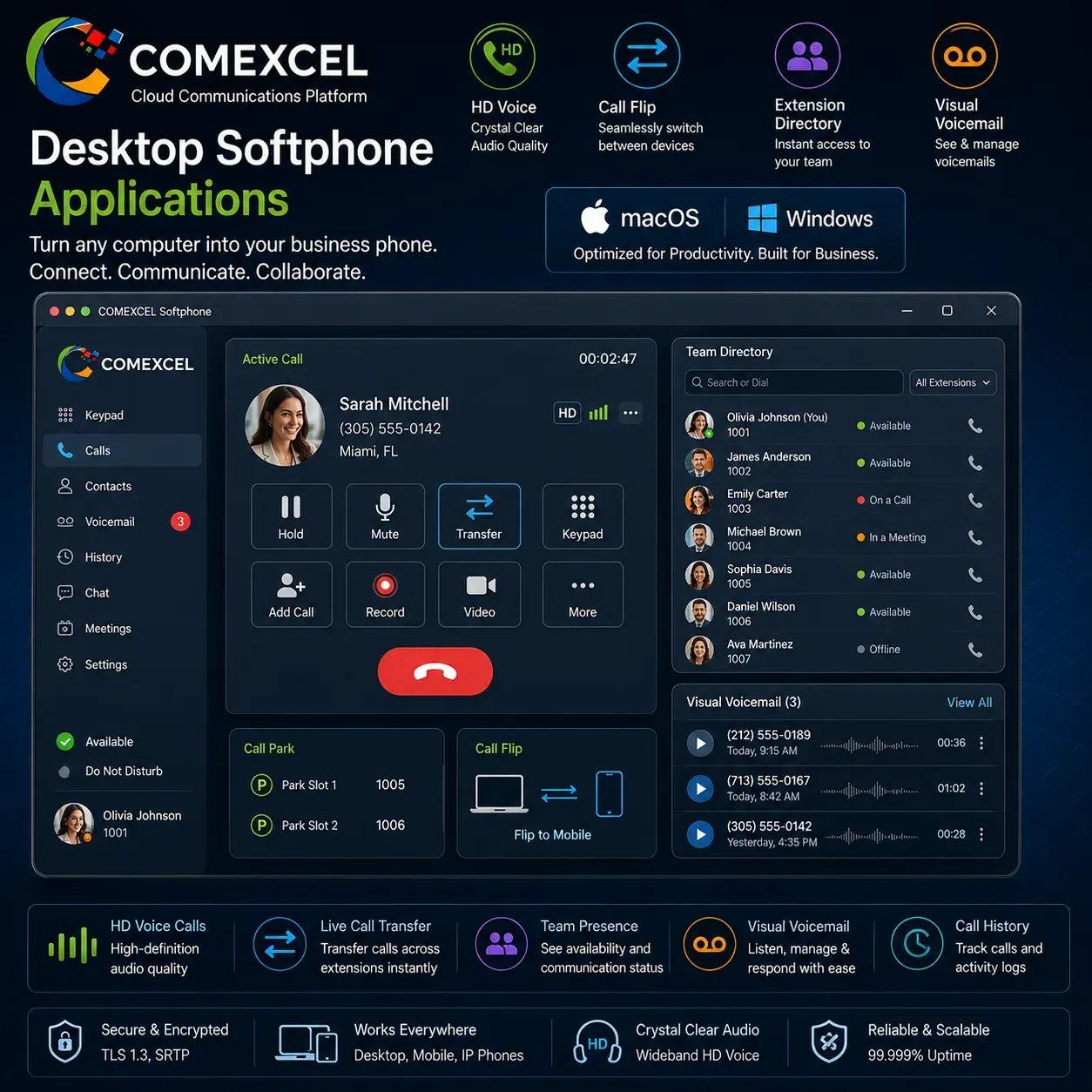
Desktop Softphone Applications

Turn any macOS or Windows computer into an enterprise phone system with HD voice, call flip, and visual voicemail. Transfer live calls across company extensions and monitor team presence directly from your desktop.Explore Desktop Apps

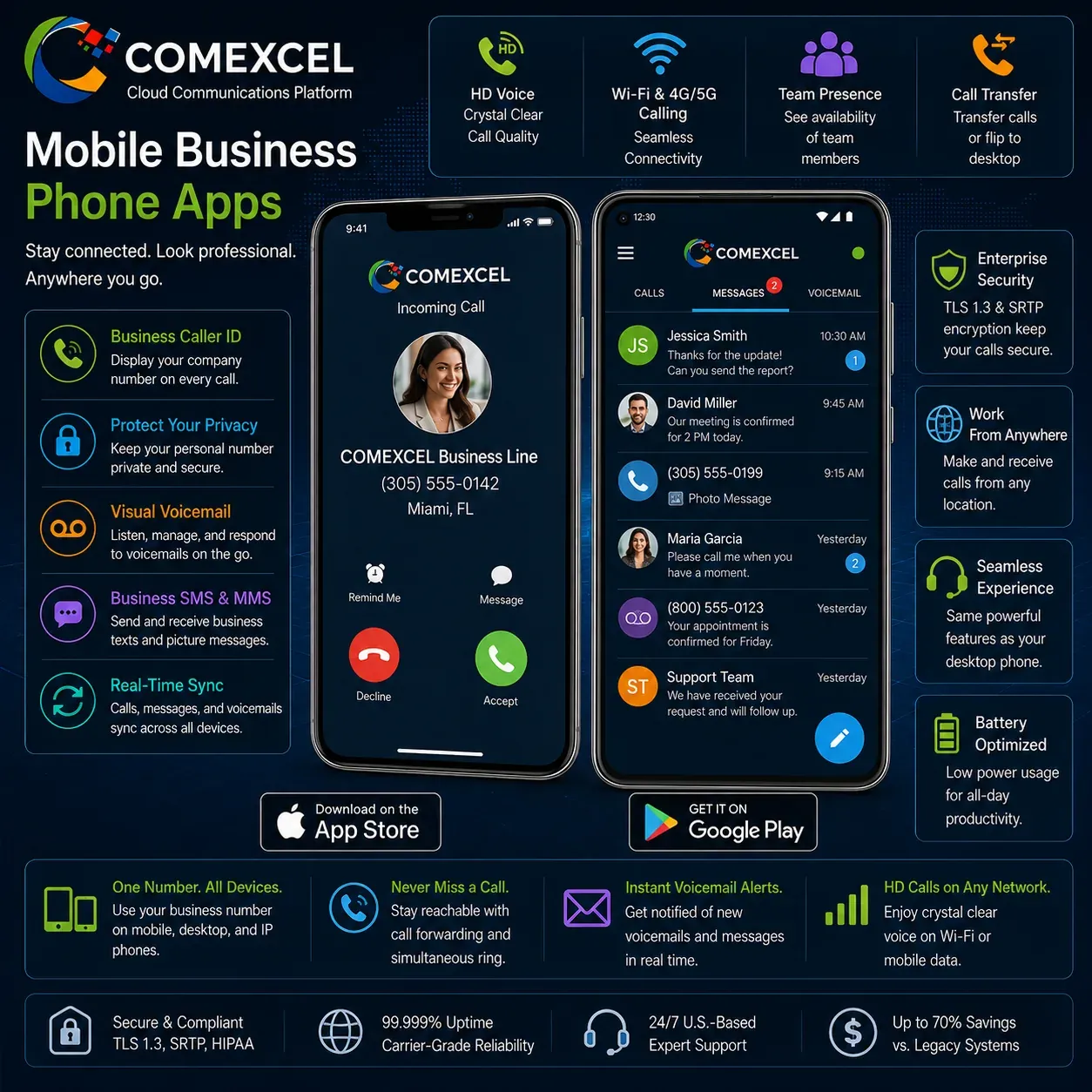
Mobile Business Phone Apps

Place and receive calls on iOS and Android smartphones while displaying your company caller ID. Protect personal cell phone privacy and maintain real-time access to business voicemails and text messages.Explore Mobile Apps

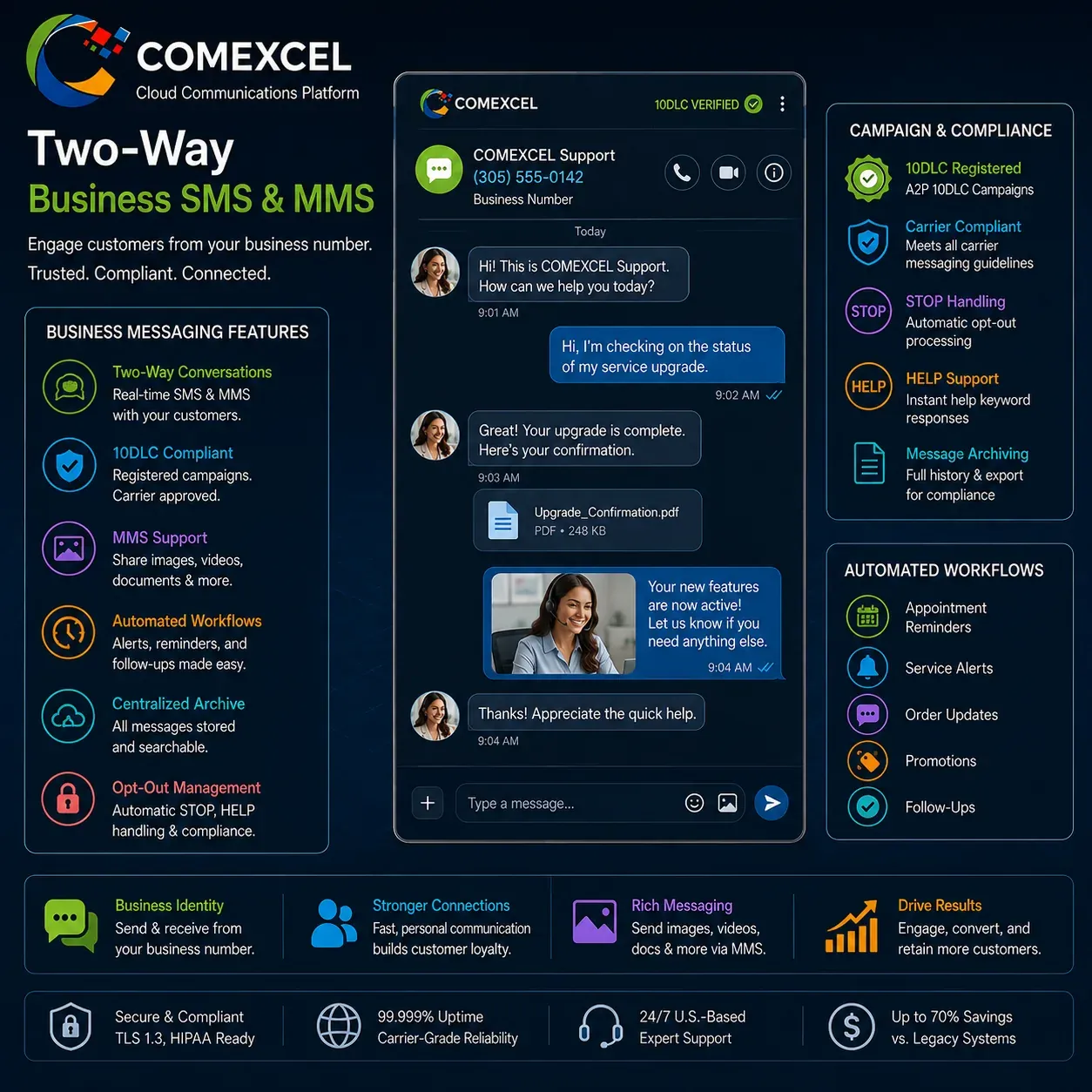
Two-Way Business SMS & MMS

Message customers directly from your business number for updates, support chats, and appointment reminders. Ensure full carrier compliance with registered 10DLC campaigns and synchronized centralized messaging archives.Explore Business SMS

Enterprise Governance: Carrier-Grade Security, Reliability, and Nomadic E911

Transitioning to a remote or hybrid workforce requires enterprise security safeguards and life-safety compliance beyond the traditional office perimeter. COMEXCEL safeguards voice traffic using end-to-end cryptographic signaling and media encryption protocols. Distributed workforce platforms must also maintain strict compliance with federal public safety mandates for nomadic emergency dialing. Our platform provides comprehensive administrative governance, protecting data integrity across all remote endpoints.

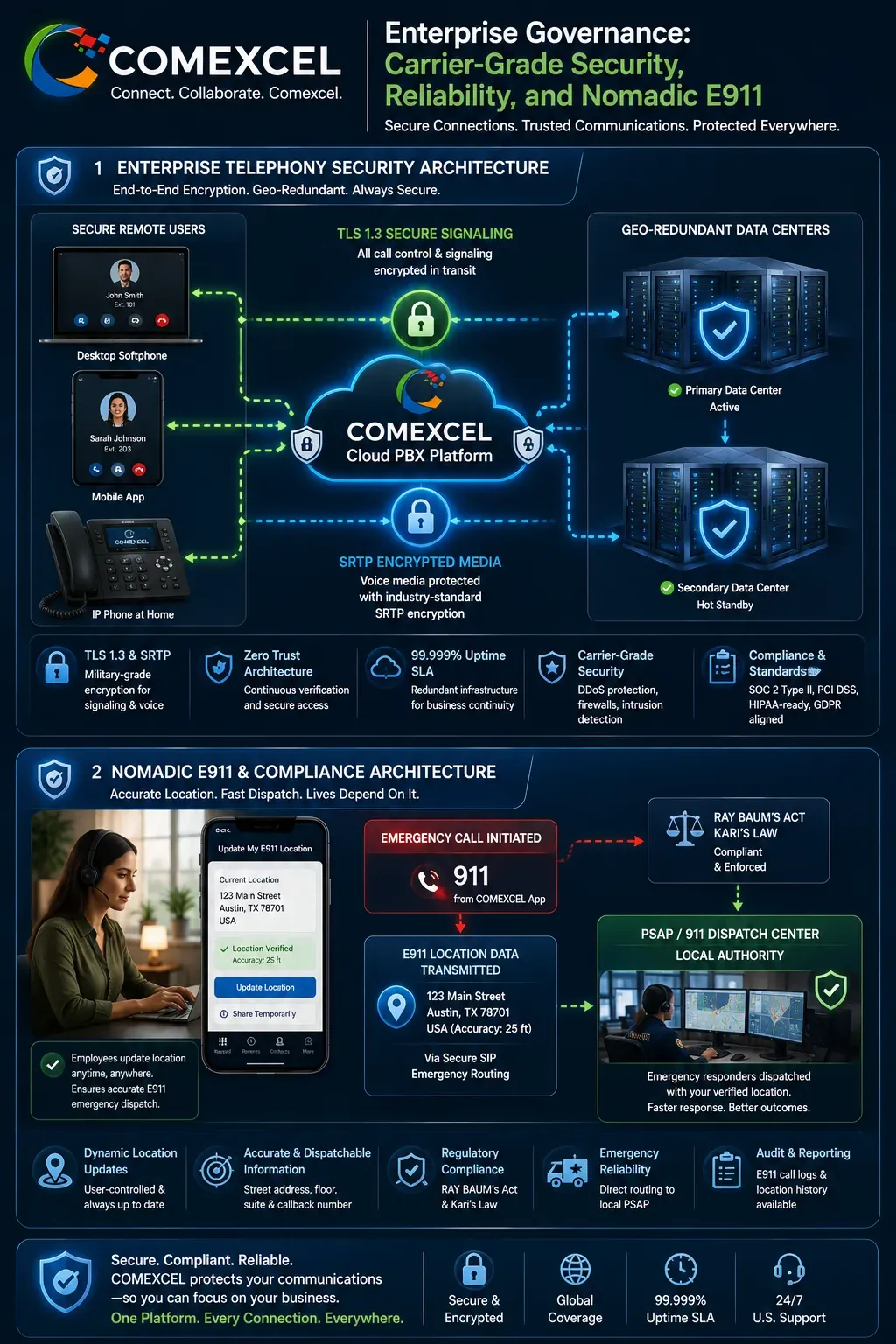
TLS 1.3 Signaling and SRTP Media Encryption

Secure all voice streams and SIP signaling messages across open internet connections against eavesdropping and data tampering. Enterprise-grade cryptographic protocols ensure voice traffic moving between home offices and the cloud remains protected. These safeguards satisfy strict enterprise regulatory mandates, including HIPAA and financial privacy standards.

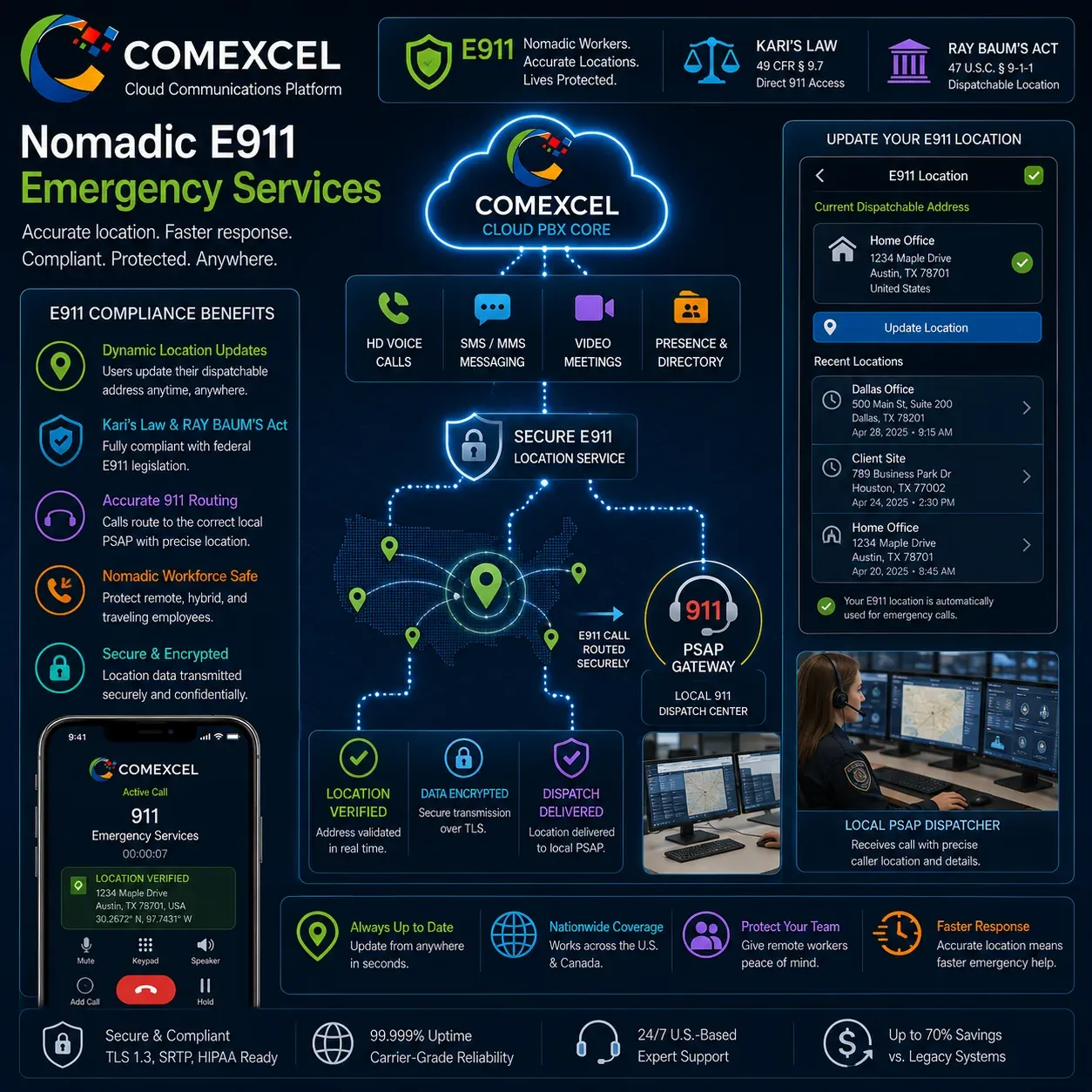
Nomadic E911 and Dispatchable Location Compliance

Maintain regulatory compliance with Kari’s Law and RAY BAUM’S Act across all nomadic softphone users. Employees can easily verify and update their physical dispatchable address directly within the desktop or mobile application. When a 911 call is placed, the exact registered location transmits instantly to the nearest Public Safety Answering Point (PSAP).

Centralized Role-Based Access Control and 99.999% SLA

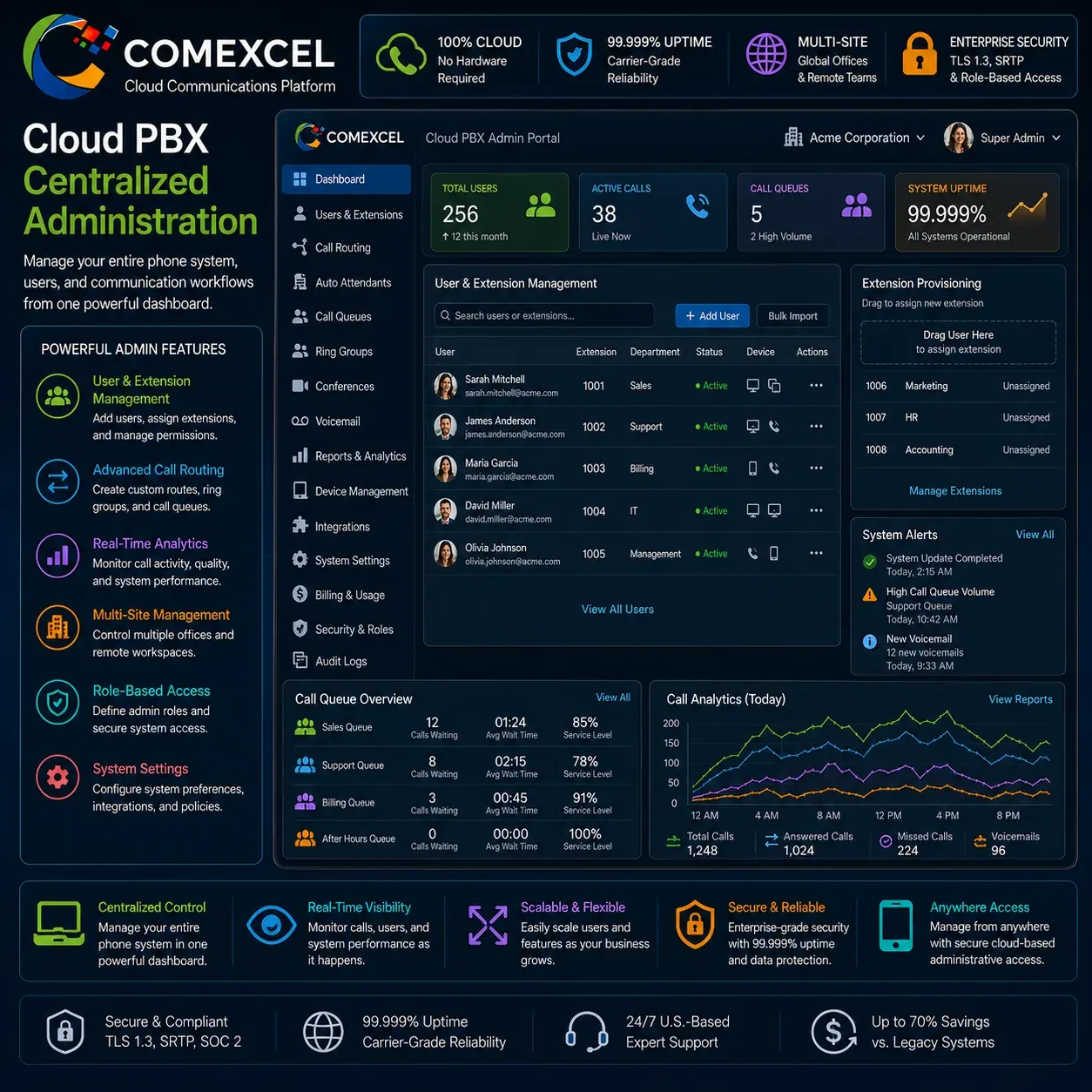
Manage multi-tenant permissions, user provisioning, and device authentication from a centralized administrative console. Administrators control extension assignments, call recording access, and security policies without touching physical hardware. High-availability geo-redundant data centers back the entire platform with a 99.999% SLA uptime guarantee.

Security blueprint illustrating TLS 1.3 signaling, SRTP media encryption, and dynamic dispatchable nomadic E911 location transmission to emergency responders.

Centralized Platform Governance, Integration & Life Safety

Equip your remote workforce with enterprise-grade CRM integrations, dynamic E911 life-safety compliance, and centralized cloud administration. Ensure your distributed communications remain compliant, secure, and easily managed from a single administrative console.

CRM Telephony Integrations

Connect voice channels directly with Salesforce, HubSpot, Zoho, and Microsoft 365 for instant caller screen pops. Automatically log call durations, notes, recordings, and follow-up activities without manual data entry.Explore CRM Integrations

Nomadic E911 Emergency Services

Protect nomadic and remote workers with dynamic dispatchable address management compliant with Kari’s Law and RAY BAUM’S Act. Ensure emergency 911 calls automatically route to the proper local PSAP with precise physical location data.Explore E911 Compliance

Cloud PBX Centralized Administration

Provision users, assign extensions, configure routing rules, and monitor system analytics from a centralized administrative portal. Manage distributed offices, home workspaces, and mobile endpoints through enterprise role-based access control.Explore Cloud PBX

Cost Reduction and High ROI: Save Up to 70% Over Legacy Systems

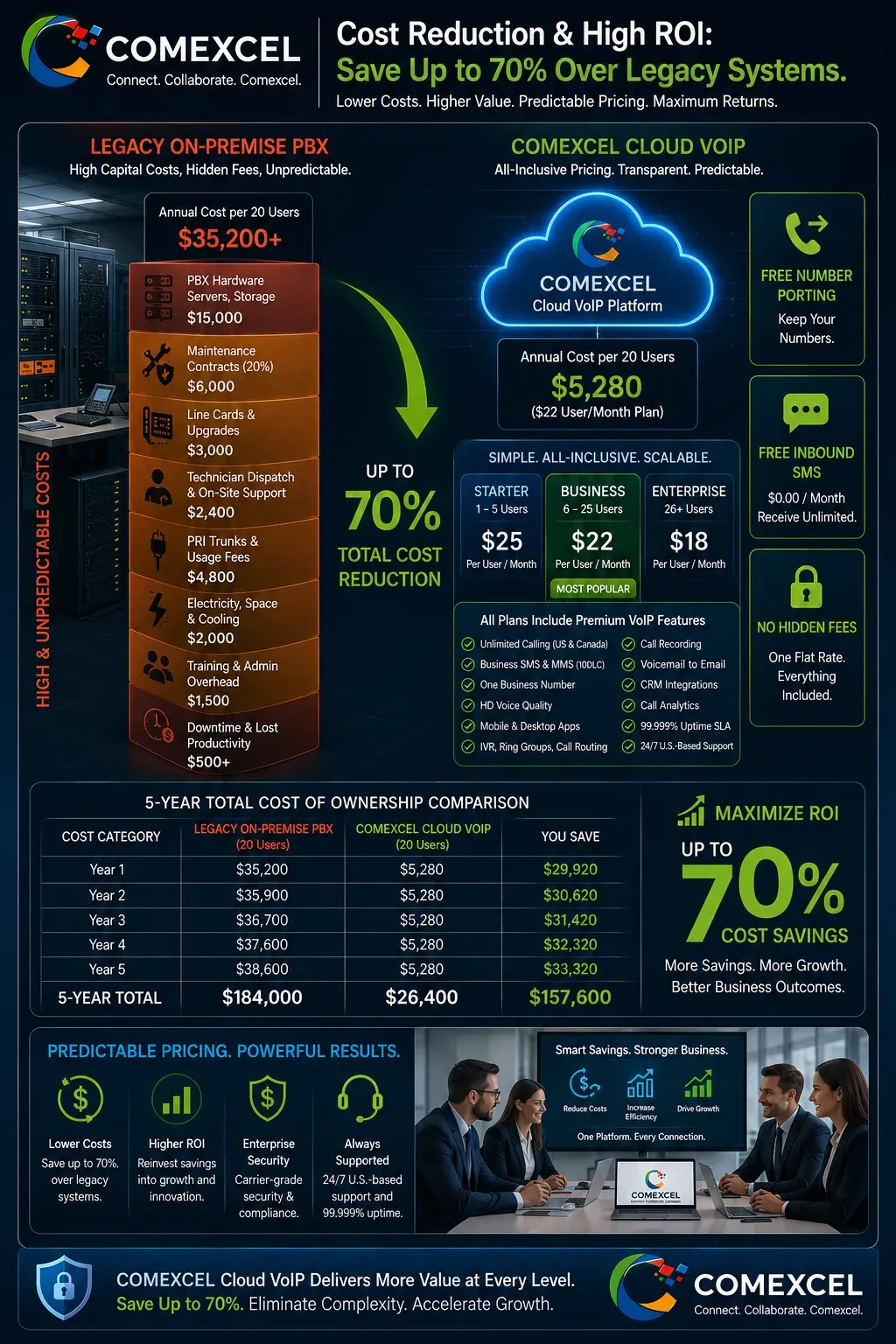
Replacing legacy PBX hardware with COMEXCEL cloud communications yields immediate operational cost reductions and capital savings. Organizations eliminate expensive PBX maintenance contracts, dedicated on-premise PRI/T1 lines, and specialized telecom hardware technician fees. Cloud-native scalability allows businesses to provision remote seats on demand, paying only for active users without over-provisioning infrastructure. Predictable, transparent monthly subscriptions reduce total cost of ownership by up to 70% while improving remote team agility.

Flexible Tiered Plans for Distributed Teams

Scale your communications infrastructure predictably as your organization grows.

  • Starter ($25/user/month): Tailored for 1–5 users; includes full Business VoIP, mobile and desktop softphones, and digital auto-attendant.
  • Business ($22/user/month): Tailored for 6–25 users; adds CRM integrations, multi-level IVR, and cloud call recording.
  • Enterprise ($18/user/month): Tailored for 26+ users; includes advanced workforce analytics, priority support, and enterprise API access.

Immediate Capital Expenditure and Maintenance Savings

Eliminate the need to purchase costly on-site PBX servers, line cards, and proprietary desk hardware. Cloud software updates, security patches, and telecom infrastructure maintenance are managed automatically at the platform level. These operational efficiencies translate into sustainable long-term savings and maximize your telecom investment return.

Transparent Pricing with Free Number Porting

Transition your business smoothly without hidden fees or surprise telecommunications charges. Keep all existing business telephone numbers, toll-free lines, and vanity numbers with 100% free number porting. Every plan includes free inbound SMS and cost-effective outbound messaging at $0.015 per message.

Financial bar graph and ROI matrix comparing legacy on-premise PBX capital expenditures against COMEXCEL predictable monthly per-user cloud VoIP pricing.

Scalable Communications for Every Distributed Team

Organization / TeamPrimary Remote Communication ChallengeCOMEXCEL Tailored Solution
Small Businesses (1–5 Users)Maintaining professional caller ID without expensive hardwareCloud softphones with virtual business numbers and mobile apps
Hybrid Offices (6–25 Users)Seamlessly transitioning between corporate desks and home officesUnified Cloud PBX with extension dialing and simultaneous ring
Distributed Enterprises (26+ Users)Centralized provisioning, multi-site routing, and security complianceMulti-tenant admin portal, SSO, CRM sync, and advanced analytics
Remote Sales TeamsHigh-volume outreach and disconnected activity loggingClick-to-dial, 10DLC two-way SMS, and automatic CRM call logging
Remote Support TeamsManaging queue spikes without physical supervisory floor oversightCloud call queues, live supervisor monitoring, and queue analytics

Remote & Hybrid Work Communications FAQs

How do remote employees make business calls without exposing personal phone numbers?

COMEXCEL softphone applications for desktop and mobile allow staff to place outbound calls that display the company’s verified corporate caller ID instead of personal mobile numbers.

  • Outbound voice calls and SMS text messages show the company name and virtual business number.
  • Incoming calls to the employee’s direct extension or department ring group route directly to the app.
  • Personal cellular numbers, private text threads, and personal voicemails remain isolated.

Can employees use their office desk phone extension from home?

Yes, COMEXCEL assigns universal short extension dialing across all authorized endpoints regardless of physical location.

  • Remote workers can dial colleagues using standard 3-digit or 4-digit extension numbers.
  • Live customer calls can be transferred to remote team members or home offices.
  • Real-time team presence displays whether a remote colleague is available, on a call, or offline.

How does nomadic E911 work when an employee changes remote work locations?

COMEXCEL complies with Kari’s Law and RAY BAUM’S Act by allowing remote employees to dynamically update their dispatchable address.

  • Staff can verify and update their physical street address and apartment/suite directly in the app.
  • Emergency 911 calls route to the appropriate local Public Safety Answering Point (PSAP).
  • Automated dispatch notifications alert internal safety administrators when an emergency call occurs.

Can remote team members send and receive business SMS from their laptops?

Yes, COMEXCEL includes integrated two-way business SMS and MMS messaging directly within desktop and mobile softphone apps.

  • Employees send text updates and multimedia attachments using the corporate business number.
  • Outbound messaging adheres to standard carrier-registered 10DLC brand compliance.
  • Centralized messaging logs ensure customer text interactions are preserved within company records.

How do CRM integrations help remote sales and customer support teams?

CRM telephony integration bridges phone activity directly into platforms like Salesforce, HubSpot, Zoho, and Microsoft 365.

  • Inbound calls automatically trigger customer profile screen pops with notes and deal stages.
  • Sales reps can initiate outbound calls with 1-click browser click-to-dial functionality.
  • Call durations, timestamps, recordings, and follow-ups log automatically to CRM timelines.

What internet connection speed is required for high-definition remote VoIP calls?

COMEXCEL voice traffic uses optimized HD audio codecs that operate efficiently over standard residential broadband and mobile cellular data.

  • Standard HD voice calls require approximately 85 kbps to 100 kbps of dedicated bandwidth per line.
  • TLS 1.3 cryptographic signaling and SRTP encryption safeguard voice data over public networks.
  • Mobile apps automatically optimize quality between Wi-Fi and 5G/LTE networks.

How does centralized Cloud PBX administration work for multi-location teams?

Administrators manage all remote workers, physical offices, and virtual numbers from a single web-based management portal.

  • Provision new user extensions, assign DIDs, and update permissions in real time.
  • Adjust auto-attendant menus, business hours, and ring group routing on demand.
  • Enforce role-based access control (RBAC) and review centralized call analytics remotely.

Can we keep our existing business phone numbers when switching to COMEXCEL?

Yes, COMEXCEL provides free business number porting for all local, toll-free, and vanity numbers.

  • Retain all published business numbers, department lines, and direct inward dialing extensions.
  • Number transfers are scheduled with zero downtime to active customer communications.
  • Temporary numbers can be provisioned during the onboarding phase to test routing configurations.
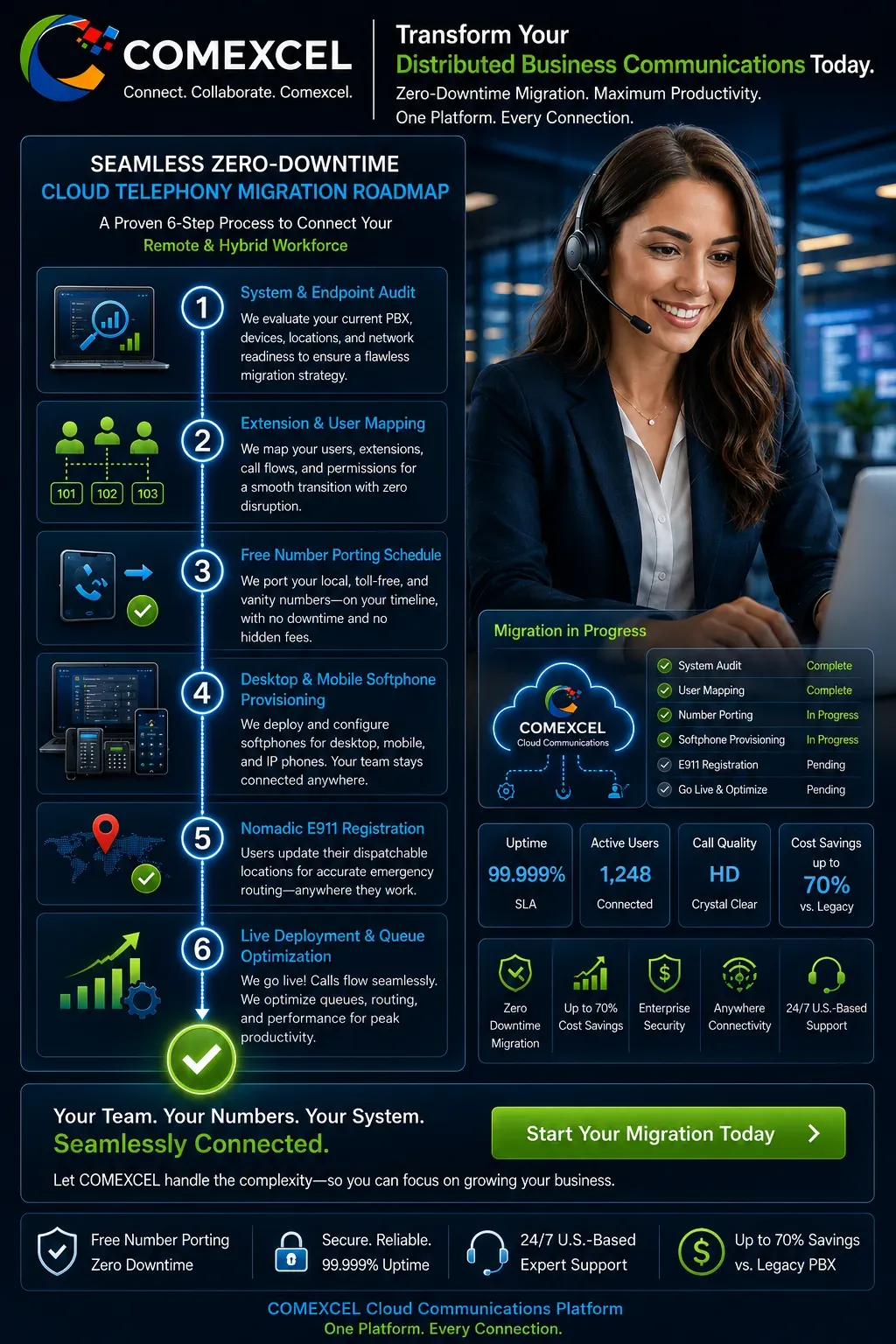
Process roadmap diagram displaying the 6-step zero-downtime migration path to COMEXCEL cloud communications for remote and hybrid workforces.

Transform Your Distributed Business Communications Today

Migrating your remote and hybrid workforce to COMEXCEL eliminates expensive legacy PBX maintenance, protects employee personal phone privacy, and modernizes your customer experience. Our cloud-hosted VoIP platform provides instant access to enterprise calling, business SMS, CRM screen pops, and dynamic nomadic E911 from any location. Experience carrier-grade reliability backed by a 99.999% SLA and dedicated 24/7 U.S.-based support. Deploy seats on demand and reduce your monthly telecommunications operating costs by up to 70%.

Fast, Zero-Downtime Workforce Onboarding

Transition your distributed staff to cloud communications without interrupting daily operations or missing customer calls. Our provisioning specialists map existing extensions, configure custom routing rules, and deploy softphone applications seamlessly. Free number porting ensures your published corporate identity remains fully preserved throughout the migration.

Up to 70% Telecom Cost Reduction

Eliminate high on-premise PBX maintenance contracts, proprietary hardware purchases, and expensive technician service fees. Transparent per-user monthly billing allows organizations to pay only for active team members while scaling capacity on demand. Cloud-native efficiency translates directly into predictable, sustainable operational savings for remote and hybrid teams.

Carrier-Grade Reliability and Round-the-Clock Support

Ensure business continuity across every remote workspace with high-availability cloud infrastructure backed by a 99.999% SLA. Built-in automatic failover routes calls to mobile endpoints or alternate locations during localized internet disruptions. Dedicated 24/7 U.S.-based technical support is always available to assist administrators and remote employees.