Effective Date: September 10, 2026 | Last Updated: September 10, 2026
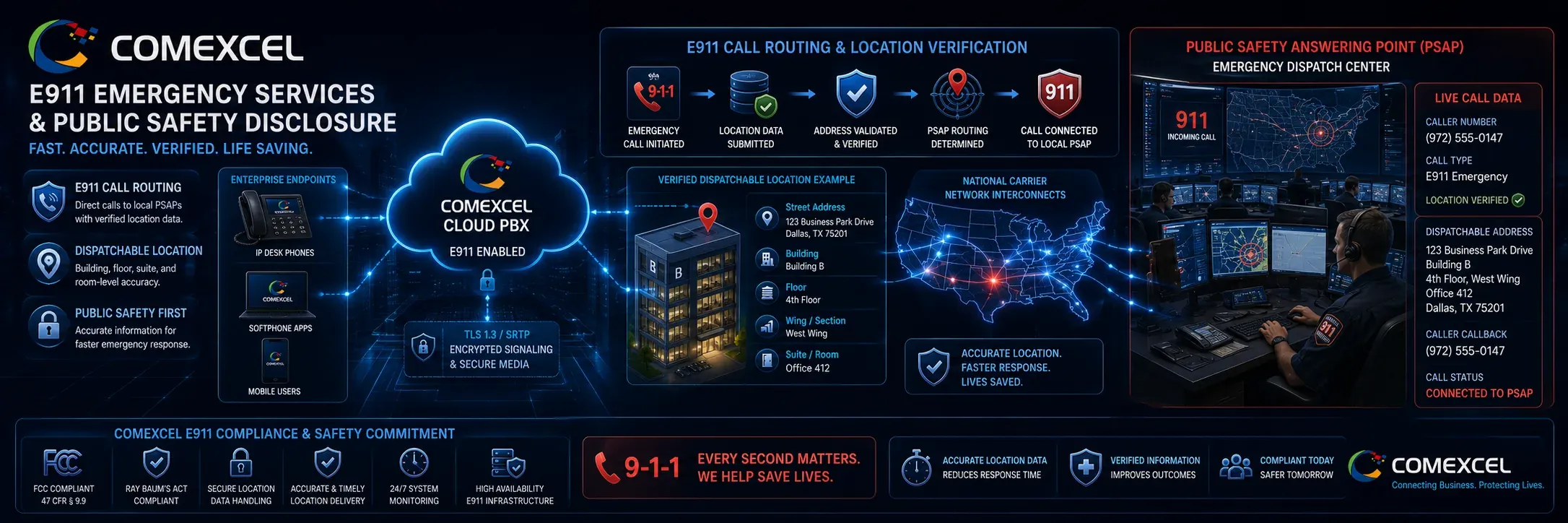
COMEXCEL E911 and Emergency Services Disclosure establishes mandatory public safety procedures, operational dependencies, and subscriber compliance standards governing emergency calling across our Business VoIP Phone Service & Hosted Cloud PBX Infrastructure, SIP trunking, desktop softphones, and mobile applications. VoIP 911 emergency dialing operates differently from traditional analog wireline 911 service. Your ability to connect to emergency response operators and the accuracy of the location information provided to first responders depend on active broadband connectivity, electrical power availability, correct network firewall routing, and maintaining an up-to-date, validated Registered Physical Location with COMEXCEL. This document forms a legally binding public safety addendum incorporated directly into our master Terms of Service.
E911 Policy at a Glance
- Direct 911 Dialing (Kari’s Law): All COMEXCEL Cloud PBX extensions allow direct 911 dialing without dialing an outside line prefix (such as 9).
- Dispatchable Location (RAY BAUM’S Act): In accordance with the centralized COMEXCEL Legal & Compliance Hub standards, customers must provide validated physical addresses, including specific building, floor, suite, and room data.
- Nomadic & Remote Workers: Moving a softphone or IP desk phone to a new address does not automatically update emergency records; manual portal updates are mandatory.
- Power & Network Dependencies: Emergency calling will fail during electrical outages or broadband disruptions without battery backups (UPS) and cellular failovers.
- Physical Warning Stickers: Account administrators must affix FCC-compliant E911 warning labels to all physical IP desk phones and terminal equipment.
Purpose, Scope & FCC Part 9 Framework
This E911 & Emergency Services Disclosure applies to all interconnected Voice over IP (VoIP) services provided by COMEXCEL, including Cloud PBX, SIP trunking, desktop softphones, mobile VoIP applications, and hardware IP endpoints. In accordance with Federal Communications Commission (FCC) rules under 47 CFR Part 9, interconnected VoIP providers must inform subscribers of the circumstances under which E911 service may be unavailable or limited compared to traditional wireline phone service. This document forms a legally binding addendum to the COMEXCEL Terms of Service and is governed in conjunction with our Acceptable Use Policy.
How COMEXCEL VoIP E911 Operates
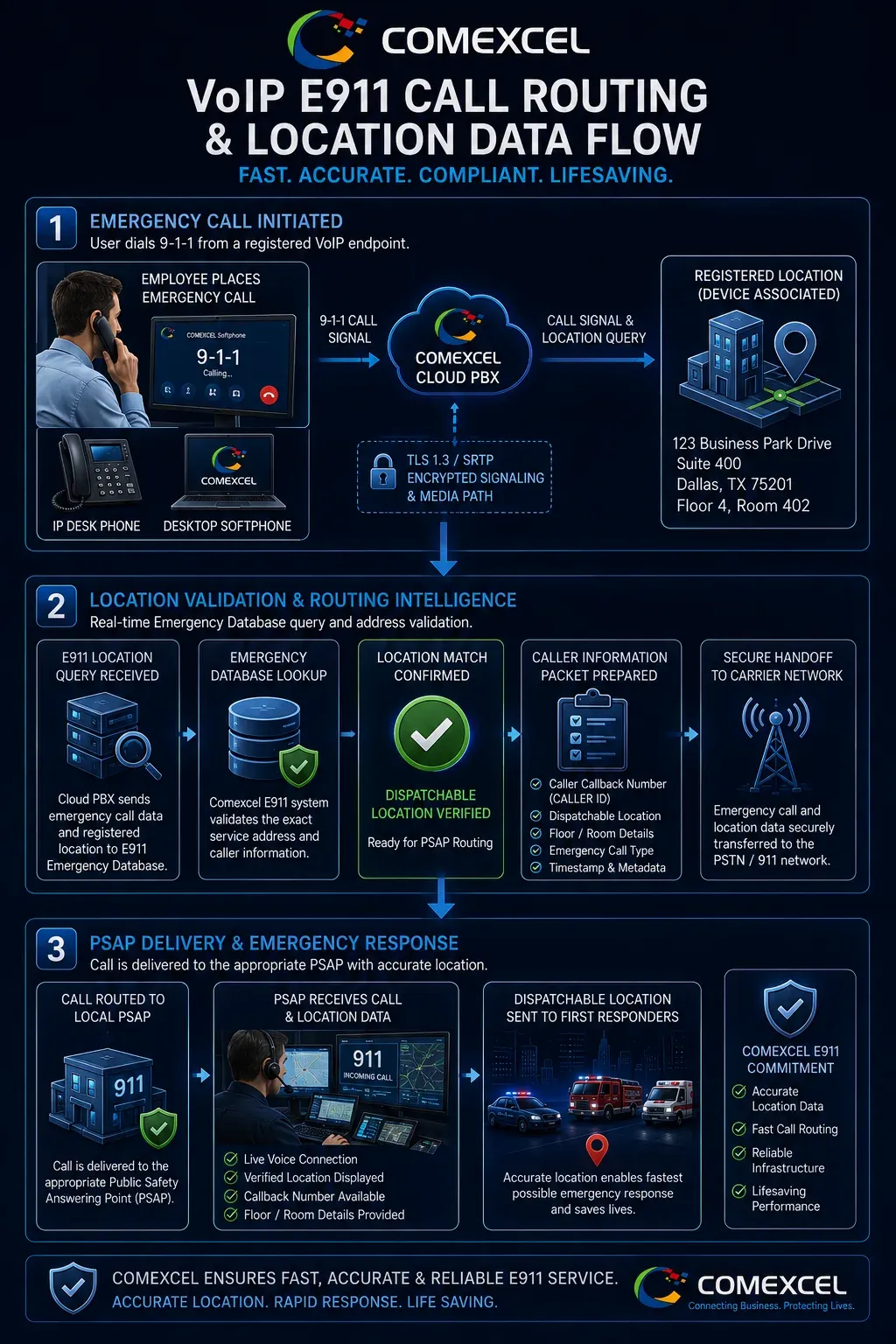
When an authorized user dials 9-1-1 from a COMEXCEL endpoint:
- The call is routed across our voice network to specialized national emergency routing gateways.
- The emergency gateway matches the originating extension or Direct Inward Dialing (DID) number against the Registered Physical Location in the COMEXCEL database.
- The call and corresponding location records are transmitted to the designated Public Safety Answering Point (PSAP) or local emergency dispatch center serving that geographic area.
- Emergency operators receive the caller’s telephone callback number and registered physical address on their dispatch consoles.
Registered Location vs. Dispatchable Location
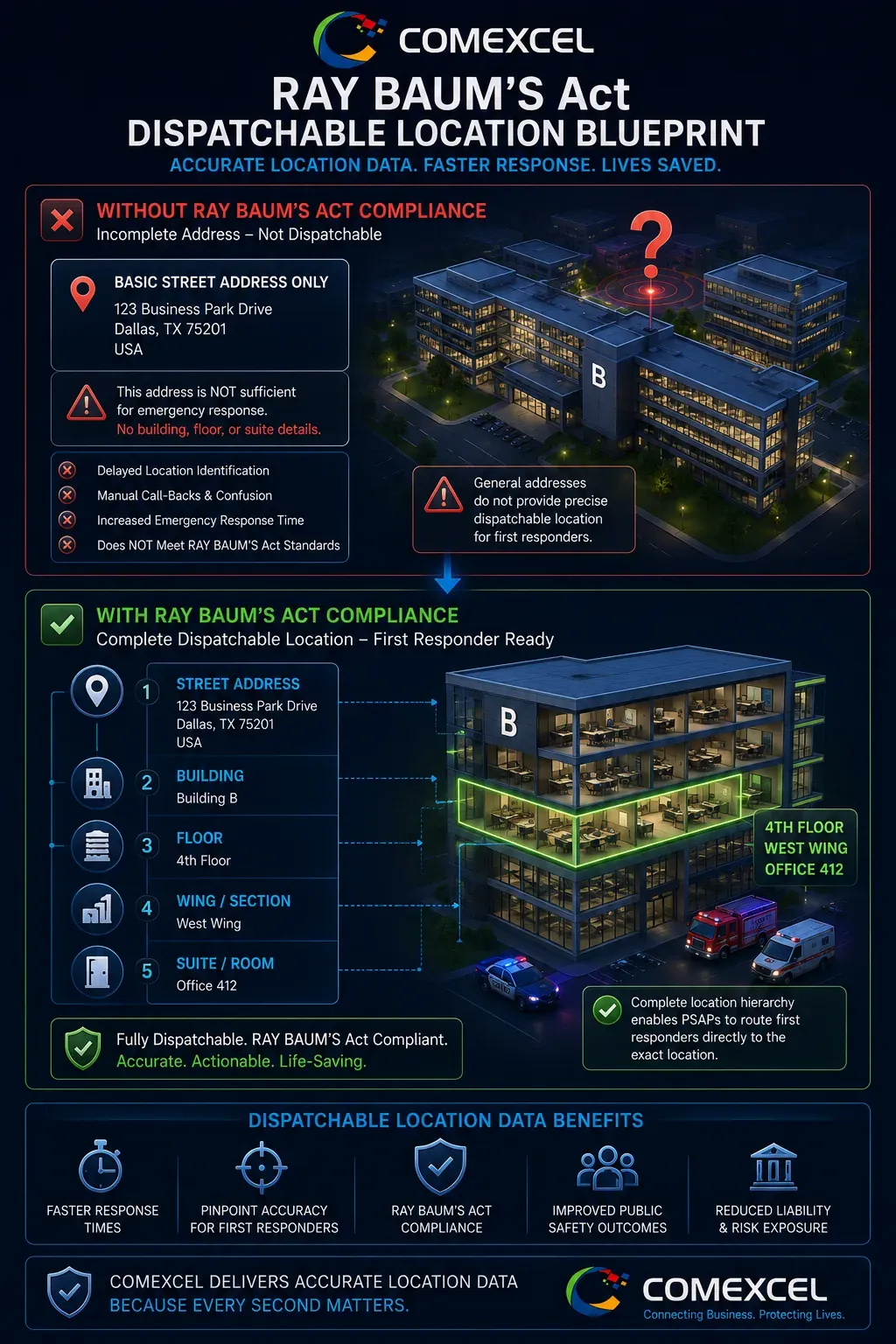
Under the RAY BAUM’S Act, enterprise telecommunications systems must convey a Dispatchable Location with every 911 call:
- Registered Location: The baseline physical street address associated with a VoIP account or extension.
- Dispatchable Location: A validated street address plus necessary sub-location details—such as building letter, floor number, suite, room, or specific desk quadrant—to enable first responders to locate the caller quickly in multi-tenant or campus environments.
Example of Compliant Dispatchable Detail:
Standard Address: 500 Enterprise Parkway, Suite 400
Dispatchable Detail: Building B, 4th Floor, West Wing, Room 412
Power Outages, Internet Failures & Network Dependencies
COMEXCEL VoIP services rely on broadband connectivity and electrical power. Emergency dialing will not function under the following conditions:
- Electrical Outage: If local power fails and network equipment (IP phones, modems, switches, PoE injectors, routers) lacks battery backup (UPS).
- Broadband Interruption: If your internet service provider (ISP) experiences an outage, line cut, or severe packet loss.
- Local LAN/WAN Congestion: Severe local network bottlenecks or firewall misconfigurations that block SIP signaling or RTP audio ports. Deploying automated secondary connections via Failover & Disaster Recovery mitigates broadband line drops.
Contextual Link: Failover & Disaster Recovery
Targeting URL: https://comexcel.com/features/failover-disaster-recovery/
Moving VoIP Phones & Nomadic Hardware Risks
Unlike traditional analog landlines tied to physical copper pairs, VoIP endpoints are portable.
CRITICAL WARNING: Physically moving an IP desk phone, laptop softphone, or ATA adapter to a new physical location (e.g., from headquarters to a home office or branch) does not automatically update its 911 emergency routing record. If a user dials 911 from a relocated device without updating their Registered Location in the COMEXCEL portal, emergency personnel will be dispatched to the old physical address.
Remote & Hybrid Worker Location Obligations
Administrators and remote employees must maintain accurate emergency location profiles:
- Home Offices: Remote workers must register their exact residential street address with their administrator prior to placing outbound calls.
- Traveling & Temporary Workspaces: Employees working from hotels, client sites, or coworking spaces must verify or update their softphone location profile in the COMEXCEL dashboard.
- VPN Configurations: Using corporate VPNs can mask the user’s geographic IP; emergency routing relies strictly on the provisioned Registered Location, not the VPN server exit node. Security standards governing remote endpoints can be reviewed in our Security & Trust Center.
Contextual Link: Security & Trust Center
Targeting URL: https://comexcel.com/security/
Mobile Softphone Apps vs. Cellular Native 911
When operating the COMEXCEL mobile application on iOS or Android devices:
- Use Native Cellular Dialers for 911: Always place emergency calls using your mobile phone’s native cellular phone dialer whenever cellular coverage is available.
- Cellular GPS Precision: Native cellular emergency calls utilize direct wireless carrier triangulation and device GPS capabilities, providing higher real-time location precision than an over-the-top VoIP app.
Multi-Location & Enterprise Campus Deployments
For enterprise deployments spanning corporate offices, retail stores, satellite clinics, and distribution centers:
- Account administrators must assign distinct Registered Locations to each physical branch and extension group.
- Sub-locations (building wings, specific floors) must be mapped to individual extensions or department DIDs to prevent routing all corporate 911 calls to a single headquarters PSAP.
Kari’s Law Compliance: Direct 911 Dialing
Under Kari’s Law (enacted under 47 CFR § 9.16), all Multi-Line Telephone Systems (MLTS) and Cloud PBX platforms must be configured to allow callers to dial 9-1-1 directly without requiring any prefix, access code, or outside-line trunk key (such as 9+911 or 8+911). All COMEXCEL extensions are provisioned for direct 911 dialing.
| Statutory Mandate | Legal Requirement | Technical Implementation | Compliance Status |
|---|---|---|---|
| Kari’s Law (Direct Dialing) | Direct 9-1-1 access with zero trunk/outside prefixes. | Outbound digit maps bypass pre-dial requirements across all softphones and desk hardware. | Enforced by Default |
| Kari’s Law (On-Site Alerts) | Instant simultaneous notification to central on-site personnel. | Automated real-time email and SMS dispatch alerts sent to designated facility security teams. | Configurable in PBX |
| RAY BAUM’S Act | Transmission of validated civic address + dispatchable sub-unit details. | Granular floor, suite, and room data fields bound to DIDs and extension profiles. | Mandatory Customer Entry |
MLTS On-Site Real-Time Emergency Notifications
In compliance with Kari’s Law, COMEXCEL Cloud PBX provides automated, real-time internal emergency notifications. When a 911 call is placed from any provisioned extension, the system can automatically transmit an immediate SMS and email alert to designated on-site staff (such as the security desk, reception, facility director, or HR manager), detailing:
- The specific extension and caller name.
- The date and exact timestamp of the call.
- The caller’s assigned dispatchable physical location.
Customer & PBX Administrator Responsibilities
Customers and account administrators are legally and operationally responsible for:
- Registering accurate physical addresses for all provisioned DIDs and endpoints.
- Promptly updating location records when staff members move, transfer, or transition to remote work.
- Training all personnel regarding VoIP 911 procedures and limitations.
- Affixing physical warning stickers to all VoIP hardware.
- Maintaining uninterrupted power backup (UPS) for mission-critical routing hardware.
Address Validation & Provisioning Propagation Delays
Emergency address submissions undergo automated carrier verification against the national Master Street Address Guide (MSAG) and postal databases.
- Addresses with invalid formatting, missing suite numbers, or unrecognized street names will be flagged for correction.
- Propagation Window: Newly registered or modified addresses may take up to 24 to 48 hours to fully synchronize across downstream national 911 emergency routing databases.
Service Suspension, Inactive Accounts & 911 Impact
If a customer account is suspended or terminated due to billing default, terms violations, fraud, or intentional administrative cancellation, VoIP 911 calling functionality may be disabled. COMEXCEL is not liable for emergency call failures originating from suspended or deactivated accounts.
Comprehensive E911 Failure & Impact Matrix
| Failure Scenario | Direct Operational Impact on 911 Call | Recommended Mitigation Protocol |
|---|---|---|
| Local Power Failure | VoIP desk phones, switches, and modems go offline; 911 call cannot initiate. | Install Uninterruptible Power Supplies (UPS) on PoE network switches and routers. |
| Broadband ISP Outage | VoIP packets cannot reach cloud gateways; emergency call drops or fails. | Deploy dual-WAN failover with LTE/5G cellular backup routers. |
| Relocated Hardware (Unupdated) | 911 call routes to the wrong PSAP; responders arrive at previous location. | Require employees to submit portal address updates immediately upon relocation. |
| Incomplete Suite / Floor Info | First responders reach street address but face building access delays. | Populate granular dispatchable sub-location fields during user setup. |
| Mobile App on Wi-Fi Only | Lacks cellular GPS tracking; relies strictly on static registered address. | Switch to native cellular phone dialer for all mobile emergency calls. |
| SIP ALG / Firewall Port Block | SIP signaling drops; two-way audio fails during the emergency dispatch. | Disable SIP ALG in local firewall settings; whitelist COMEXCEL IPs. |
Alternative Emergency Preparedness Requirements
Because VoIP communications depend on external utility infrastructure, COMEXCEL strongly advises all enterprise organizations, healthcare facilities, and multi-location businesses to maintain alternative emergency calling channels:
- Traditional analog POTS lines or dedicated wireless terminal gateways connected to fire and safety alarm panels.
- Fully charged mobile cellular devices accessible to staff across all operational shifts.
Physical Warning Labels & Mandatory User Advisories
In compliance with FCC regulations, COMEXCEL provides printed and digital E911 Warning Labels. Customers must affix these warning stickers conspicuously to the front or side of every physical IP desk phone, analog telephone adapter (ATA), and communication terminal provisioned on the network:
┌────────────────────────────────────────────────────────┐
│               WARNING: VOIP E911 SERVICE               │
│ Emergency 911 calling is limited or unavailable during │
│   power outages, internet failures, or if this phone   │
│   has been moved without updating its 911 address.     │
│   Keep an alternate emergency phone available.         │
└────────────────────────────────────────────────────────┘
Enterprise Deployment & Audit Checklist
Before activating a new office, remote user group, or Cloud PBX deployment, IT administrators should complete this audit:
- [ ] Verify MSAG postal validation for every primary office facility.
- [ ] Populate building, floor, and suite details for all multi-tenant spaces.
- [ ] Assign specific DID phone numbers to individual physical desks/workstations.
- [ ] Confirm direct 911 dialing without external line prefixes.
- [ ] Configure internal real-time email/SMS notification alerts for security teams.
- [ ] Audit remote employee residential addresses quarterly.
- [ ] Apply physical warning stickers to all provisioned IP desk hardware.
- [ ] Test local uninterruptible battery power supplies on critical network switches.
Frequently Asked Questions (FAQ) & Emergency Support
Does COMEXCEL Business VoIP support 911 emergency dialing?
Yes. COMEXCEL provides full interconnected VoIP E911 capabilities across provisioned telephone numbers in the United States and Canada in accordance with FCC regulations.
What is the difference between a Registered Location and a Dispatchable Location?
A Registered Location is the baseline street address tied to a number. A Dispatchable Location includes specific sub-unit data (such as “Suite 400, Floor 3, Conference Room B”) required under RAY BAUM’S Act to pinpoint callers in large facilities.
What happens if I take my IP phone home or to a hotel?
The phone will continue to make calls, but its 911 profile remains tied to its previous location until an administrator or user updates the physical address in the COMEXCEL portal.
Does VoIP 911 work during a power or internet outage?
No. Unless your local routers, switches, and phones are connected to active battery backups (UPS) and redundant internet connections, VoIP emergency calling will be unavailable.
How quickly do address changes take effect?
Address updates are submitted to national emergency databases immediately, but database synchronization across regional carrier gateways can take between 24 and 48 hours.
Can remote employees use mobile apps to call 911?
While softphones can initiate emergency calls, COMEXCEL recommends using your smartphone’s native cellular dialer to leverage mobile carrier GPS triangulation.
What are the requirements under Kari’s Law for multi-line phone systems?
Kari’s Law mandates that all cloud PBX and enterprise systems allow users to dial 911 directly without a prefix and automatically send real-time alerts to on-site personnel.
How do I update my physical E911 address in the system?
Account administrators and users can update their dispatch address by logging into the COMEXCEL Management Portal, navigating to Extension Settings, and selecting E911 Address.
Can an enterprise run live 911 test calls to verify emergency routing?
Scheduled 911 test calls must be coordinated through your local PSAP’s non-emergency administration line prior to placing the call. You must state immediately upon connection that it is a non-emergency test of a new VoIP phone deployment.
Need to Update Your Emergency Location?
Ensuring your physical dispatch address is up to date is critical for life safety and FCC regulatory compliance. Account administrators and remote users can update address records directly within the account dashboard.